PIMplify Starter Guide:
De Datos Brutos a un Catálogo Perfecto
La ruta más rápida para dominar PIMplify. Aprenda a configurar el contexto de su empresa, conectar su PIM/Excel, seleccionar campos de contexto y encadenar prompts modulares.
Conecte su PIM o empiece con Excel / CSV
PIMplify ofrece dos formas flexibles de trabajar con su catálogo de productos:
Conecte su tienda o PIM mediante claves API seguras. PIMplify actualiza atributos en tiempo real y guarda los textos directamente en su base de datos.
Exporte su archivo de catálogo y arrástrelo a PIMplify. Nuestro procesador maneja estructuras EAV, divisas y miles de SKUs en segundos.
En PIMplify simplemente marca: 1) Columnas de Contexto (datos que la IA debe leer, ej. Marca, Material, Color) y 2) Columnas de Enriquecimiento (el campo exacto que la IA debe generar, ej. body_html o meta_title).
Contexto de Empresa (Su Base de IA)
Antes de crear prompts individuales, configure el contexto global de su negocio en Ajustes para transmitir la identidad de su marca a la IA.
Describa su historia y autoridad en el sector. Ej.: 'Somos una tienda online de referencia con 20 años de experiencia en equipamiento técnico outdoor.'
Defina a sus clientes y cómo hablarles (ej. dirigiéndose siempre directamente en 2ª persona: 'tú' y 'tu').
Destaque producción europea, envíos rápidos o políticas de garantía.
PIMplify incluye este contexto automáticamente en todos los prompts de IA, garantizando un tono coherente en sus 10.000 productos.
La Estrategia: 5 Guías Modulares en su Biblioteca
En lugar de escribir un prompt enorme cada vez, cree 5 bloques especializados en PIMplify que podrá combinar con un solo clic o con el comando @:
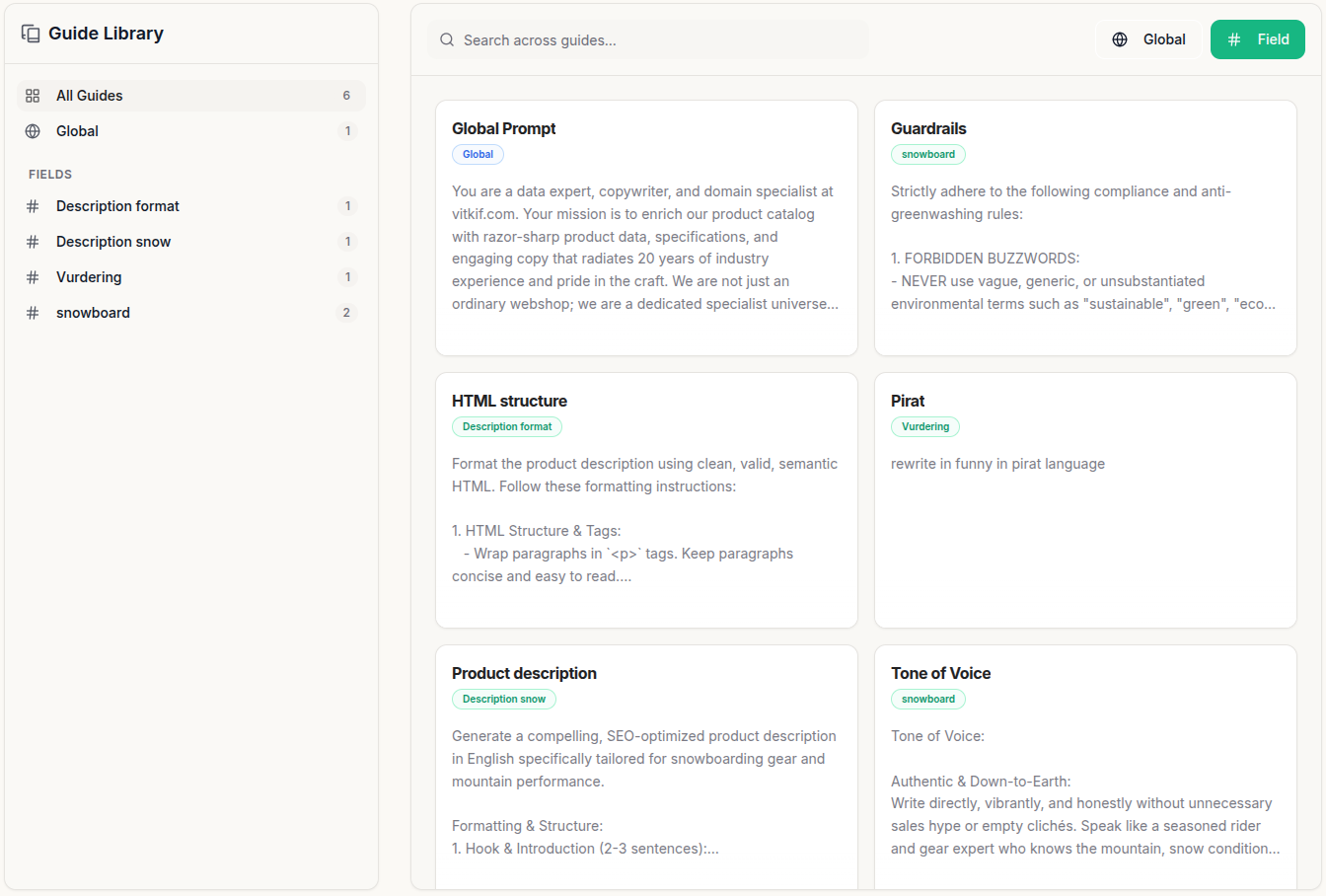
Para generar descripciones completas necesita estructura HTML, guardrails y tono de voz. PIMplify los encadena automáticamente:
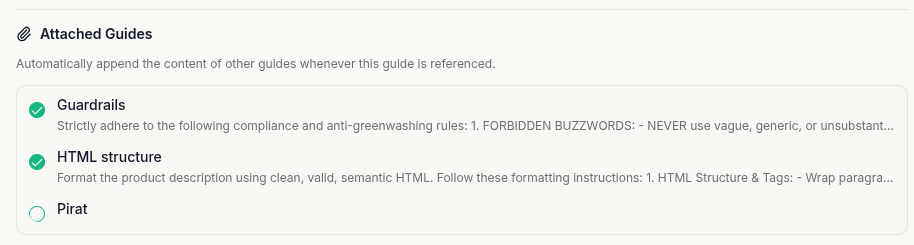
- Abra su guía principal (ej. 'Product description') en Guide Library (/app/guides).
- Marque las casillas en 'Attached Guides' (ej. HTML structure, Guardrails y Tone of Voice).
- Al seleccionar @Product description, PIMplify unifica toda la cadena automáticamente en segundo plano.
Al elegir una guía maestra, PIMplify muestra chips verdes (ej. [✓ HTML structure] [✓ Guardrails]). Pase el cursor y haga clic en 'Desplegar a texto' para personalizar el contenido para esa ejecución específica.
Global AI Guide y Ajustes de Motor
La Global AI Guide es su centro de mando general para todas las columnas del lote. Aquí también configura los ajustes del motor de IA:
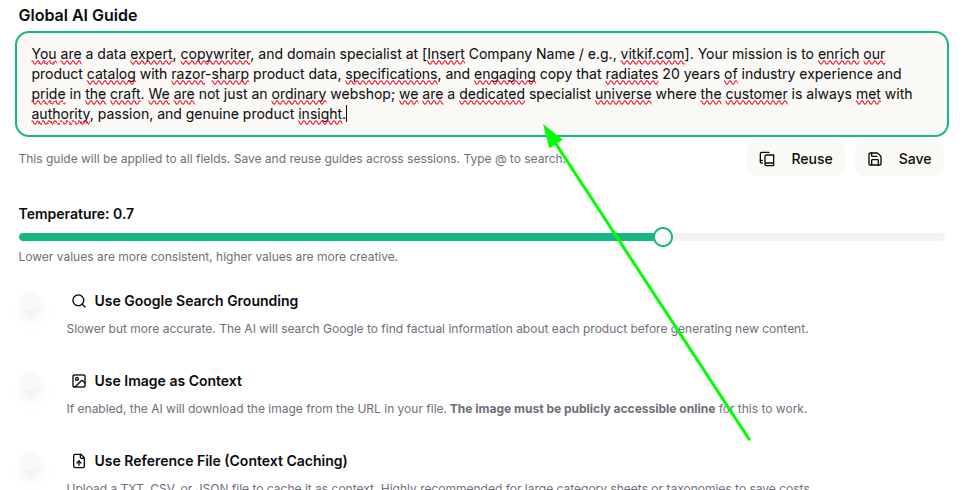
Funciones como Live Google Search Grounding y Vision AI aumentan considerablemente los tokens. Para el 90% de los productos con especificaciones existentes, no son necesarias. Manténgalas desactivadas por defecto.
Ajustes de Motor Explicados:
Equilibrio ideal entre redacción comercial atractiva y fidelidad estricta a los datos técnicos.
PIMplify almacena el contexto de su empresa en la memoria de Vertex AI, reduciendo costes hasta un 75%.
Permite a Gemini buscar en Google especificaciones ausentes. Usar selectivamente.
Analiza imágenes de producto directamente (materiales, cortes, colores). Desactivar para archivos de solo texto.
Seleccionar campos para contexto (Dar a Gemini los datos correctos)
En el Paso 1 de su ejecución por lotes, usted elige exactamente qué columnas del catálogo puede ver Gemini. Proporcionar datos limpios elimina alucinaciones y reduce tokens:
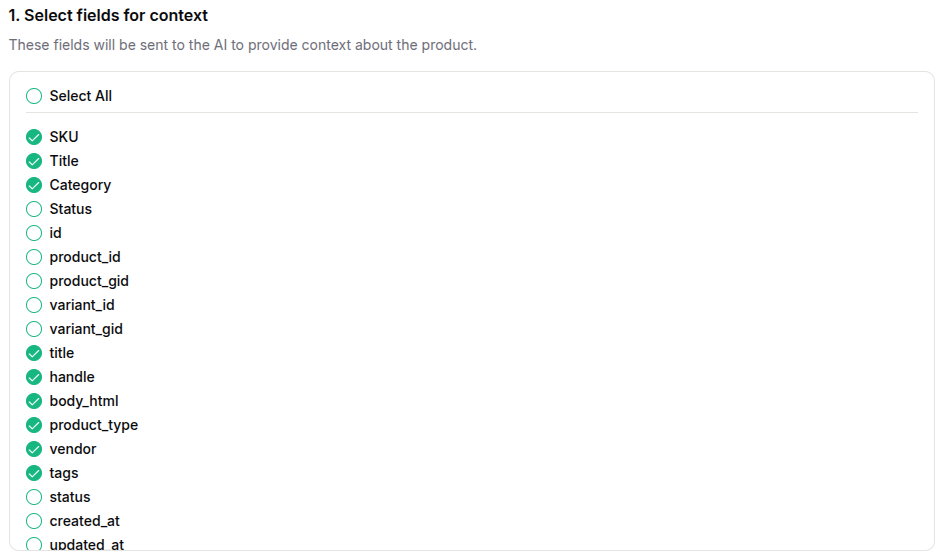
SKU, Título, Categoría, Marca, Material, Color, Tipo de Producto, Etiquetas y especificaciones existentes. Aportan sustancia a la IA.
IDs de base de datos, product_gid, variant_id, created_at, updated_at y estados de sistema. No aportan valor a la redacción.
Seleccionar campos a optimizar y asignar guías
En el Paso 2 de la ejecución por lotes, marque las columnas que Gemini debe generar o enriquecer (ej. body_html, meta_description, bullet_points). Luego asigne sus guías:
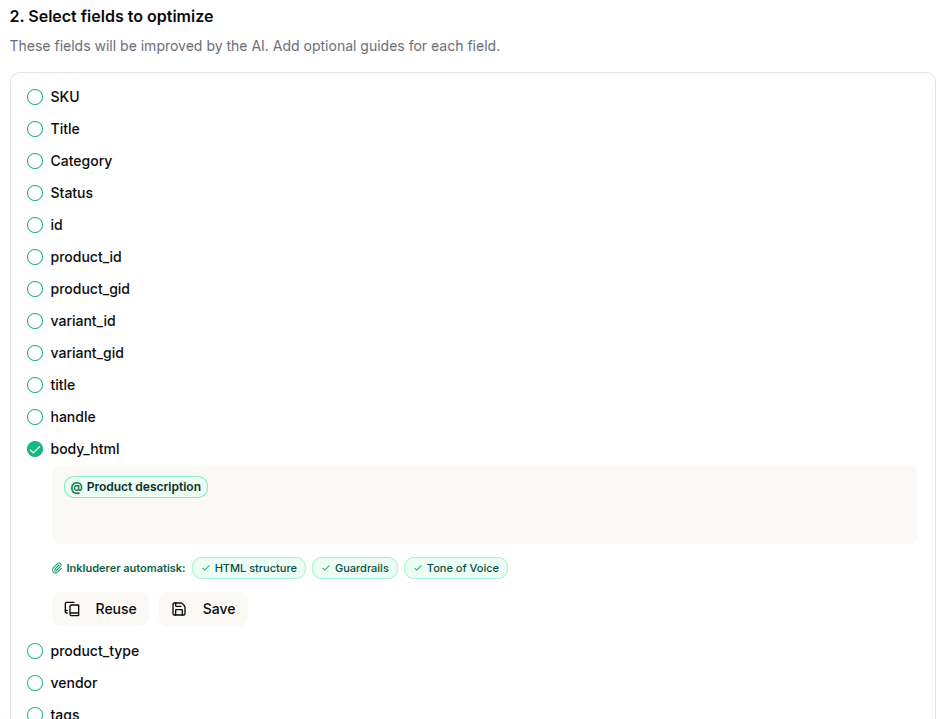
Escriba '@' o pulse 'Reuse' para seleccionar una plantilla guardada. Al elegir @Product description, PIMplify muestra al instante los chips verdes ([✓ HTML structure] [✓ Guardrails] [✓ Tone of Voice]).
Si redacta un prompt en el campo, pulse 'Save' para añadirlo a su Guide Library.
Biblioteca de Plantillas para su Guide Library
Aquí tiene las 4 plantillas fundamentales listas para copiar directamente a su biblioteca en /app/guides:
Plantilla A: Estructura HTML y Formato
HTML Semántico Limpio • Sin Markdown • Listo para CMS
Output must be delivered strictly as clean, valid HTML code. Adhere to the following formatting rules:

1. Allowed tags: Exclusively use <p>, <br>, <strong>, <h2>, <h3>, <ul>, and <li>.
2. Headings: Use <h2> for the primary section heading and <h3> for sub-headings when dividing content.
3. Emphasis: Use <strong> to highlight key benefits, core specs, or important keywords.
4. Lists: Use <ul> and <li> for all technical specifications, feature breakdowns, or key highlights.
5. Paragraphs: Use <p> for body copy and <br> for intentional line breaks within paragraphs.
6. Clean markup: Never include CSS styles, classes, IDs, or inline styles in HTML tags.
7. Validation: Ensure all tags are opened and closed properly. Output must be 100% ready for direct CMS/PIM insertion.
8. No Markdown: Never use markdown symbols (like #, ##, or **). Use only the defined HTML tags.
9. Typography: Never use en-dashes (–) or em-dashes (—). Only use standard hyphens (-) when necessary.
Plantilla B: Guardrails y Cumplimiento
Anti-Greenwashing • Directivas UE • Seguridad Legal
Strictly adhere to the following business and legal guardrails:

1. Anti-Greenwashing & Environmental Claims:
   - Never use unsubstantiated buzzwords like "sustainable", "eco-friendly", "green", or "planet-positive".
   - Only describe factual materials (e.g., "Crafted with 40% recycled polyester").
   - Only mention official environmental certifications (e.g., OEKO-TEX, GOTS, FSC) if explicitly present in source data.

2. Tone & Addressing:
   - Always address the reader directly in 2nd person: "you" and "your".
   - Write in an active present voice without passive constructions (e.g., write "You experience optimal support" instead of "Optimal support is experienced").

3. Accuracy & Hallucination Prevention:
   - Never invent features, warranty terms, or material compositions not found in the source data.
Plantilla C: Tono de Voz y Marca
Auténtico • Cercano • Trato Directo al Cliente
Tone of Voice Guidelines:

• Authentic & Down-to-Earth:
  Write directly, vibrantly, and honestly without unnecessary sales fluff or empty clichés. Speak like a style-conscious expert who knows materials and products inside out.

• Technical & Well-Grounded:
  Communicate technical terminology (such as GSM weight, weave type, cut, and fabric structure) clearly, with distinct authority and respect for craftsmanship.

• Modern & Confident:
  Keep language sharp, contemporary, and minimalist with a subtle spark that signals uncompromising quality and effortless style.
Plantilla D: Descripción Completa de Producto
Plantilla Maestra que encadena las Plantillas A, B y C
Generate an engaging, SEO-optimized product description for the 'Description' field based on the following structure:

1. Catchy Headline:
   Start with an <h2> heading that captures the product's cut, style, and primary purpose.

2. Fit & Silhouette:
   Describe in detail how the item fits. Focus on technical aspects such as shoulder cut, chest width, sleeve length, and drape. Explain why this specific cut performs optimally.

3. Material & Tactile Feel:
   Describe fabric quality, weave, and sensation against the skin (e.g., GSM weight, combed cotton, silky modal, raw texture, or breathability). Make the weight, structure, and softness tangible for the reader.

4. Signature Sign-off:
   Add a brief, memorable concluding remark with personality (e.g., having found your new everyday staple, or how it retains shape wash after wash).

5. Technical Specifications:
   End with a clean <ul><li> bullet list of exact specifications (fabric type, GSM weight, collar/seam construction, and treatment).
Importe su primer archivo Excel o conecte su PIM y enriquezca más de 10.000 productos en cuestión de minutos.
Explore Dedicated AI Solutions for Product Catalogs
See how these prompt guidelines and rules are executed automatically across our high-volume workflows: