PIMplify Starter Guide:
Van Ruwe Data naar een Perfecte Productcatalogus
De snelste weg naar succes met PIMplify. Leer hoe u uw bedrijfscontext instelt, uw PIM/Excel-catalogus koppelt, contextvelden kiest en modulaire prompts bouwt.
Koppel uw PIM of start met Excel / CSV
PIMplify biedt twee flexibele manieren om met uw productcatalogus te werken:
Verbind uw webshop of PIM via veilige API-sleutels. PIMplify werkt attributen in realtime bij en slaat verrijkte teksten direct op in uw database.
Exporteer een bestand uit uw huidige systeem en sleep het naar PIMplify. Onze parser verwerkt EAV-structuren, valuta's en duizenden rijen in seconden.
In PIMplify vinkt u eenvoudig aan: 1) Contextkolommen (data die de AI moet lezen, bijv. Merk, Materiaal, Kleur) en 2) Verrijkingskolommen (het exacte veld dat de AI moet genereren, bijv. body_html of meta_title).
Bedrijfscontext (Uw AI-Fundament)
Stel voor het maken van afzonderlijke prompts uw globale bedrijfscontext in bij Instellingen, zodat de AI uw merk-DNA begrijpt.
Beschrijf uw geschiedenis en vakkennis. Bijv.: 'Wij zijn een toonaangevende e-commerce specialist met 20 jaar ervaring in technische outdoorkleding.'
Definieer uw klanten en hoe u hen aanspreekt (bijv. altijd rechtstreeks in de 2e persoon: 'u' of 'je').
Benadruk Europese productie, snelle verzending of garantievoorwaarden.
PIMplify voegt deze context op de achtergrond toe aan alle AI-prompts, wat zorgt voor een consistente merkstem over al uw 10.000 producten.
De Strategie: 5 Modulaire Gidsen in uw Bibliotheek
In plaats van telkens één gigantische prompt te schrijven, bouwt u in PIMplify een modulaire Guide Library op. U maakt 5 gespecialiseerde bouwstenen die u met één klik of via @ combineert:
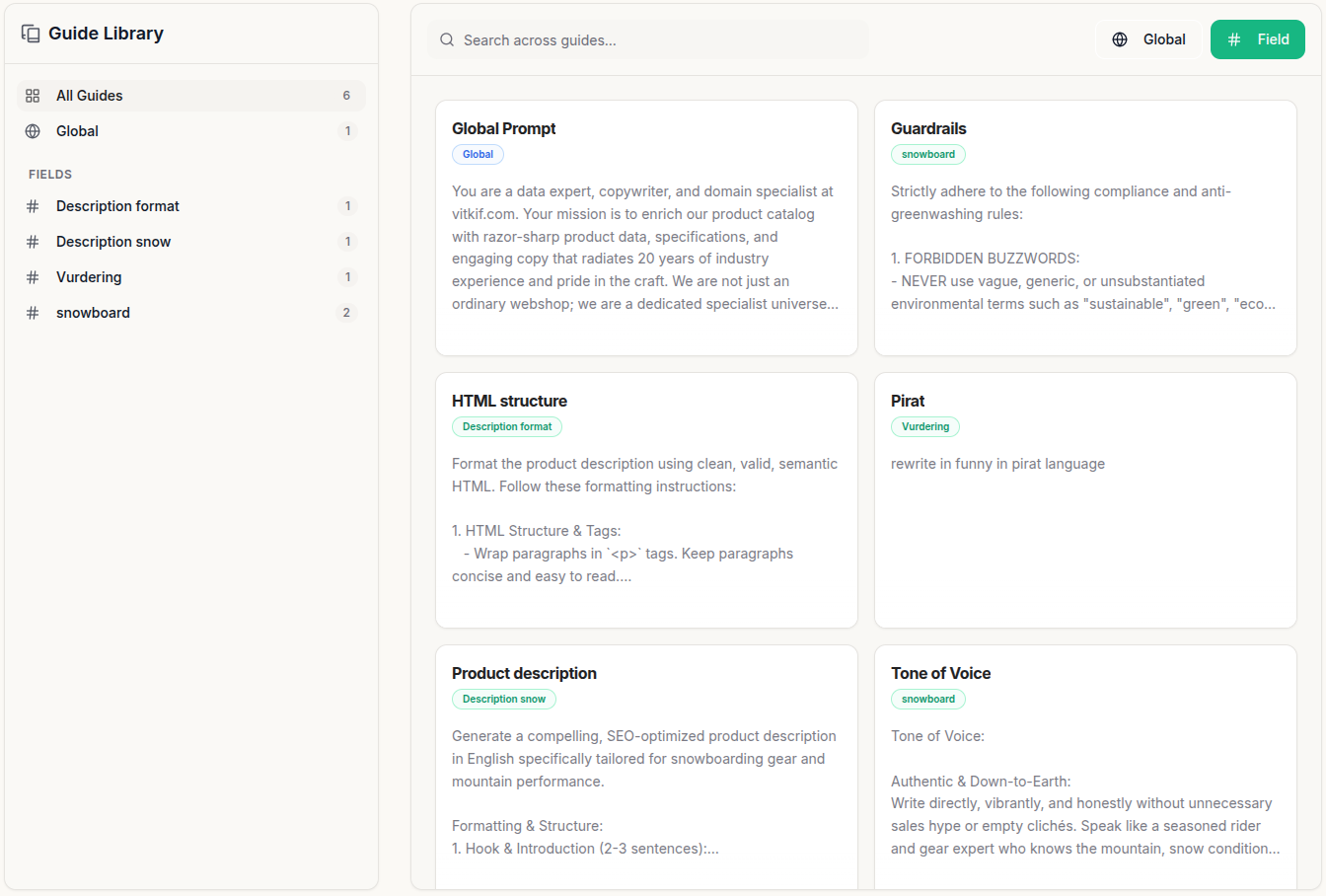
Voor complete productbeschrijvingen heeft u HTML-structuur, compliance guardrails en tone of voice nodig. PIMplify koppelt deze automatisch:
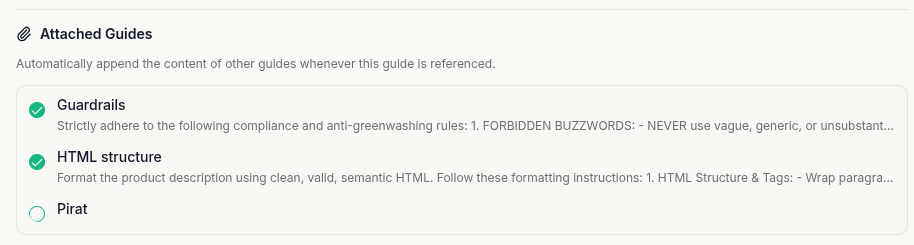
- Open uw hoofdprompt (bijv. 'Product description') in de Guide Library (/app/guides).
- Vink de sub-gidsen aan onder 'Attached Guides' (bijv. HTML structure, Guardrails en Tone of Voice).
- Zodra u @Product description selecteert, voegt PIMplify automatisch de hele keten samen op de achtergrond.
Bij het kiezen van een mastergids toont PIMplify groene badges (bijv. [✓ HTML structure] [✓ Guardrails]). Beweeg over de tag en klik op 'Uitklappen naar bewerkbare tekst' voor snelle eenmalige aanpassingen.
Global AI Guide & Engine-instellingen
De Global AI Guide is uw centrale richtlijn voor alle kolommen in de batch. Hier beheert u ook de AI-instellingen:
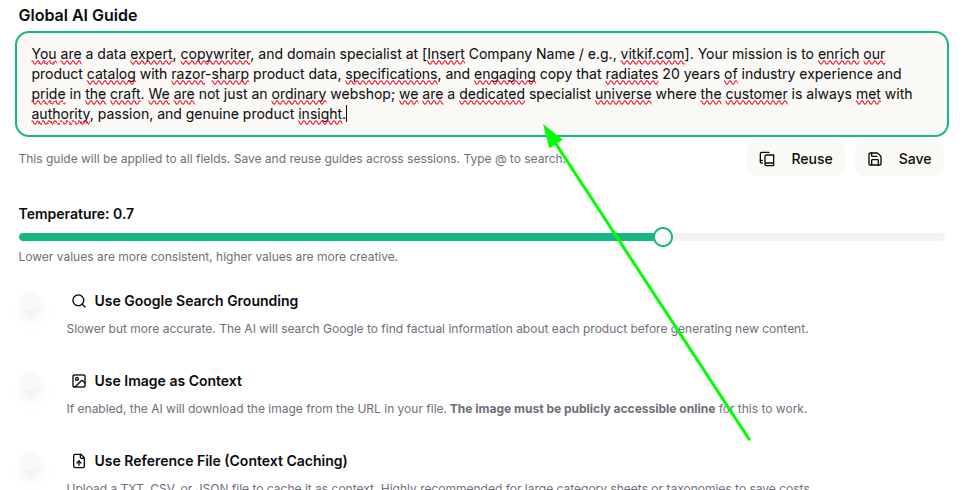
Functies zoals Live Google Search Grounding en Vision AI gebruiken aanzienlijk meer tokens. Voor 90% van de standaardproducten met bestaande specificaties zijn deze functies overbodig. Laat ze standaard uitgeschakeld.
Engine-opties Uitgelegd:
Perfecte balans tussen creatieve copywriting en strikte naleving van productspecificaties.
PIMplify slaat uw bedrijfsregels op in het Vertex AI-geheugen en bespaart tot 75% op tokenkosten.
Laat Gemini op internet zoeken naar ontbrekende productdetails. Alleen gericht gebruiken.
Analyseert productafbeeldingen direct (materialen, pasvorm, kleuren). Uitschakelen voor reguliere tekstbestanden.
Contextvelden selecteren (Gemini de juiste data voeden)
In Stap 1 van uw batchrun kiest u exact welke cataloguskolommen Gemini mag inzien. Relevante data voorkomt hallucinaties en verlaagt tokenkosten:
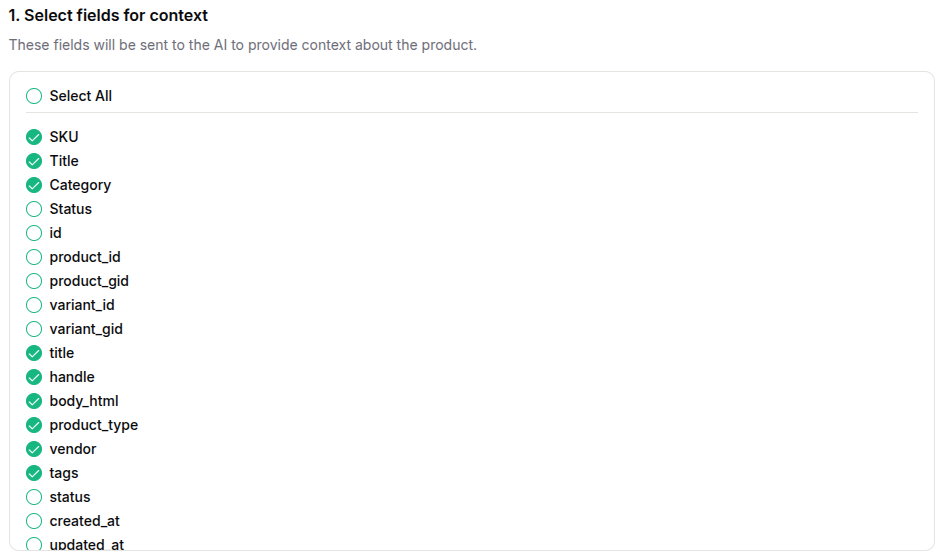
SKU, Titel, Categorie, Merk, Materiaal, Kleur, Producttype, Tags en bestaande opsommingen/specificaties. Dit geeft de AI feitelijke inhoud.
Database-ID's, product_gid, variant_id, created_at, updated_at en systeemstatussen. Deze nemen onnodige ruimte in.
Te optimaliseren velden kiezen & gidsen toewijzen
In Stap 2 van de batchrun vinkt u de velden aan die Gemini moet genereren (bijv. body_html, meta_description, bullet_points). Wijs daarna uw gidsen toe:
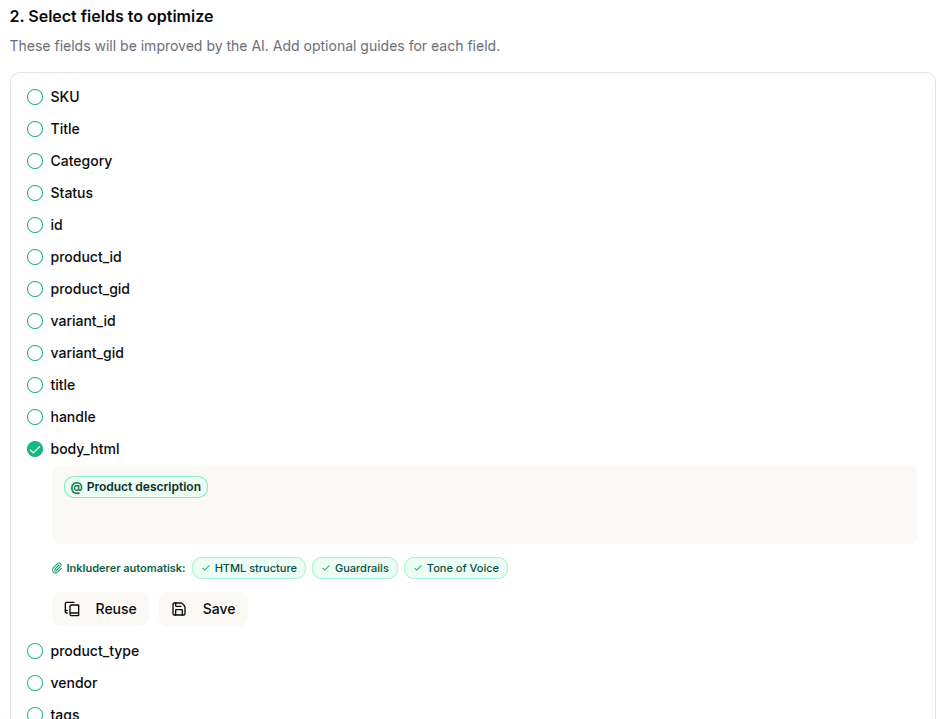
Typ '@' of klik op 'Reuse' om een sjabloon te kiezen. Bij @Product description verschijnen direct de groene badges ([✓ HTML structure] [✓ Guardrails] [✓ Tone of Voice]).
Heeft u een prompt in het veld aangepast, klik dan op 'Save' om deze toe te voegen aan uw Guide Library.
Sjablonenbibliotheek voor uw Guide Library
Hier zijn de 4 beproefde basissjablonen die u direct kunt kopiëren naar uw bibliotheek onder /app/guides:
Sjabloon A: HTML-structuur & Opmaak
Schone Semantische HTML • Geen Markdown • CMS-Gereed
Output must be delivered strictly as clean, valid HTML code. Adhere to the following formatting rules:

1. Allowed tags: Exclusively use <p>, <br>, <strong>, <h2>, <h3>, <ul>, and <li>.
2. Headings: Use <h2> for the primary section heading and <h3> for sub-headings when dividing content.
3. Emphasis: Use <strong> to highlight key benefits, core specs, or important keywords.
4. Lists: Use <ul> and <li> for all technical specifications, feature breakdowns, or key highlights.
5. Paragraphs: Use <p> for body copy and <br> for intentional line breaks within paragraphs.
6. Clean markup: Never include CSS styles, classes, IDs, or inline styles in HTML tags.
7. Validation: Ensure all tags are opened and closed properly. Output must be 100% ready for direct CMS/PIM insertion.
8. No Markdown: Never use markdown symbols (like #, ##, or **). Use only the defined HTML tags.
9. Typography: Never use en-dashes (–) or em-dashes (—). Only use standard hyphens (-) when necessary.
Sjabloon B: Guardrails & Compliance
Anti-Greenwashing • EU-Richtlijnen • Juridische Zekerheid
Strictly adhere to the following business and legal guardrails:

1. Anti-Greenwashing & Environmental Claims:
   - Never use unsubstantiated buzzwords like "sustainable", "eco-friendly", "green", or "planet-positive".
   - Only describe factual materials (e.g., "Crafted with 40% recycled polyester").
   - Only mention official environmental certifications (e.g., OEKO-TEX, GOTS, FSC) if explicitly present in source data.

2. Tone & Addressing:
   - Always address the reader directly in 2nd person: "you" and "your".
   - Write in an active present voice without passive constructions (e.g., write "You experience optimal support" instead of "Optimal support is experienced").

3. Accuracy & Hallucination Prevention:
   - Never invent features, warranty terms, or material compositions not found in the source data.
Sjabloon C: Tone of Voice & Merkstem
Authentiek • Toegankelijk • Directe Klantaanspraak
Tone of Voice Guidelines:

• Authentic & Down-to-Earth:
  Write directly, vibrantly, and honestly without unnecessary sales fluff or empty clichés. Speak like a style-conscious expert who knows materials and products inside out.

• Technical & Well-Grounded:
  Communicate technical terminology (such as GSM weight, weave type, cut, and fabric structure) clearly, with distinct authority and respect for craftsmanship.

• Modern & Confident:
  Keep language sharp, contemporary, and minimalist with a subtle spark that signals uncompromising quality and effortless style.
Sjabloon D: Volledige Productbeschrijving
Het Mastersjabloon dat Sjabloon A, B en C koppelt
Generate an engaging, SEO-optimized product description for the 'Description' field based on the following structure:

1. Catchy Headline:
   Start with an <h2> heading that captures the product's cut, style, and primary purpose.

2. Fit & Silhouette:
   Describe in detail how the item fits. Focus on technical aspects such as shoulder cut, chest width, sleeve length, and drape. Explain why this specific cut performs optimally.

3. Material & Tactile Feel:
   Describe fabric quality, weave, and sensation against the skin (e.g., GSM weight, combed cotton, silky modal, raw texture, or breathability). Make the weight, structure, and softness tangible for the reader.

4. Signature Sign-off:
   Add a brief, memorable concluding remark with personality (e.g., having found your new everyday staple, or how it retains shape wash after wash).

5. Technical Specifications:
   End with a clean <ul><li> bullet list of exact specifications (fabric type, GSM weight, collar/seam construction, and treatment).
Importeer uw eerste Excel-bestand of koppel uw PIM-systeem en verrijk 10.000+ producten binnen enkele minuten.
Explore Dedicated AI Solutions for Product Catalogs
See how these prompt guidelines and rules are executed automatically across our high-volume workflows: